
What’s a Favicon & How Do I Add it to My Website?

Updated June 2026
If you've ever noticed a tiny little icon next to a website name in your browser tab, that's a favicon. It's small, it's subtle, and most people don't think twice about it. But for your brand? It's doing more work than you'd expect.
In this post we're breaking down exactly what a favicon is, why it matters, and how to add one to your Squarespace website in just a few minutes. No code required.
What is a favicon?
A favicon (pronounced "fave-icon") is a small icon that represents your website. You'll see it in:
The browser tab when someone has your site open
The address bar of most browsers
Bookmark lists when someone saves your site
The home screen icon when someone adds your site to their phone
It's sometimes called a shortcut icon, website icon, tab icon, URL icon, or bookmark icon — they're all the same thing.
Why does your favicon matter?
You might be thinking “it's tiny, does it really matter?” It does, for a few reasons.
Brand recognition: When someone has 15 tabs open (guilty), your favicon is the only thing that identifies your site at a glance. A recognizable favicon means they find you faster and remember you more.
Professionalism: A missing or default favicon — that generic gray square — signals an unfinished website. It's a small detail that tells visitors a lot about how much you care about your brand.
Mobile home screen: When someone saves your website to their phone's home screen, your favicon becomes the app icon. This is prime brand real estate that most small business owners completely ignore.
Bookmarks: If someone bookmarks your site, your favicon shows up alongside it. Every time they open their bookmarks they see your brand.
It's a small thing that compounds over time. Worth doing right.
What should your favicon look like?
Most likely your favicon will be a simplified version of your logo — the icon or mark without the full wordmark. Since it displays at just 16x16 pixels in most browsers, you want something clean, simple, and instantly recognizable at a tiny size.
A few tips:
Avoid small text — it will be completely illegible at favicon size
Use your brand colors so it's immediately associated with your brand
If you have a logomark (a standalone symbol separate from your name) that's usually the best choice
If you worked with a designer on your branding, ask them for a favicon file — most designers include it in the deliverables
What file format should you use?
Squarespace supports the following formats for favicons:
.png — most common, works perfectly
.ico — the traditional favicon format, also works
.svg — now supported in Squarespace 7.1 and the best option if you have it, since it scales perfectly at any size
Recommended size: Upload at 300x300px even though it displays much smaller. The larger file ensures it renders crisply on retina and high-DPI screens.
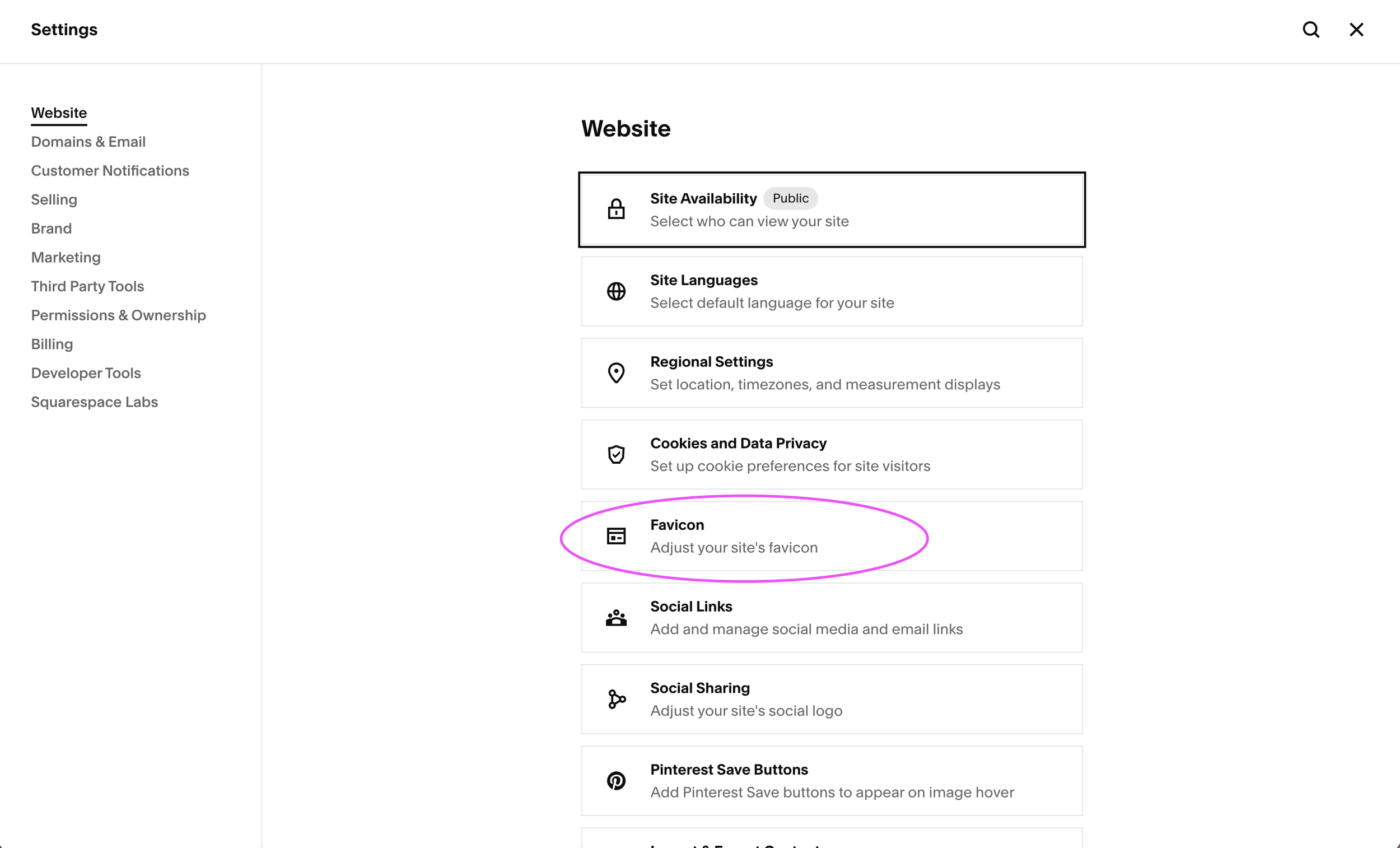
How to add a favicon to your Squarespace 7.1 website
The navigation has changed in recent Squarespace updates so here's the current path:
Log into your Squarespace account
Click Settings in the left menu at the bottom (the little gear icon)
Click Website in the left panel that pops up
Click Favicon on the main screen
Upload your favicon file (you can update different versions for light and dark browsers)
Click Save
That's it. It typically takes a few minutes to an hour to appear so if you don't see it right away, clear your browser cache or try a different browser.
How to check if your favicon is showing correctly
Once you've uploaded it, open your website in a browser and look at the tab and you should see your icon.
You can also:
Open your site in an incognito window (Command + Shift + N on Mac) to see it without cached files
Check on your phone by visiting your site in Safari or Chrome — look at the tab or save it to your home screen to see the icon
If it's still showing the default gray square after an hour, try re-uploading the file in a different format (.png usually works most reliably).
Don't have a favicon yet?
If your brand doesn't have a logomark or favicon file, a few options:
Ask your designer: if you had branding done professionally, a favicon file should have been included. If it wasn't, most designers can send one quickly.
Create one yourself: tools like Canva or Adobe Express let you create a simple square icon. Keep it simple and on-brand.
Hire us: if your branding needs a full refresh, we'd love to help. A strong brand identity includes all the files you need, favicon included.

Ready to level up your whole brand?
A favicon is just one piece of a cohesive brand presence. If your website feels inconsistent, unpolished, or just not quite right, a Squarespace template might be exactly what you need to get things looking and feeling on-brand fast.
Browse our designer-made Squarespace templates starting at $247:








A practical, page-by-page guide to the photos every small business website needs — from your homepage hero image to your contact page — with real examples and tips for making every image work harder for your brand.